
First steps
What TimeAcappella does, where to find everything in the app, and the first thing to note down.
TimeAcappella remembers the things that come round again with no fixed date: the boiler service, the car inspection, renewing your passport, the dentist. You say when you last did it; the app works out when it's next due and tells you when it's time.
Installing the app
The Download page shows which devices you can install it on, with the link for each one. On one device, TimeAcappella is free and needs no account: you can start straight away.
The five tabs
At the bottom of the screen, there are five tabs:
- To plan: your things to plan, in four tabs depending on their date: “Done”, “It's time”, “Planned” and “Estimated”. See The four tabs of To plan.
- Calendar: your calendar, by day, by month or for the whole year, with your things to plan at the right time. See Day, month, year.
- Contacts: your loved ones, and groups, that you plan things for. See Plan for a loved one.
- News: articles that are relevant to you, chosen on your phone based on your profile. Nothing is sent anywhere.
- Settings: your calendar, your reminders, your account and your plan.
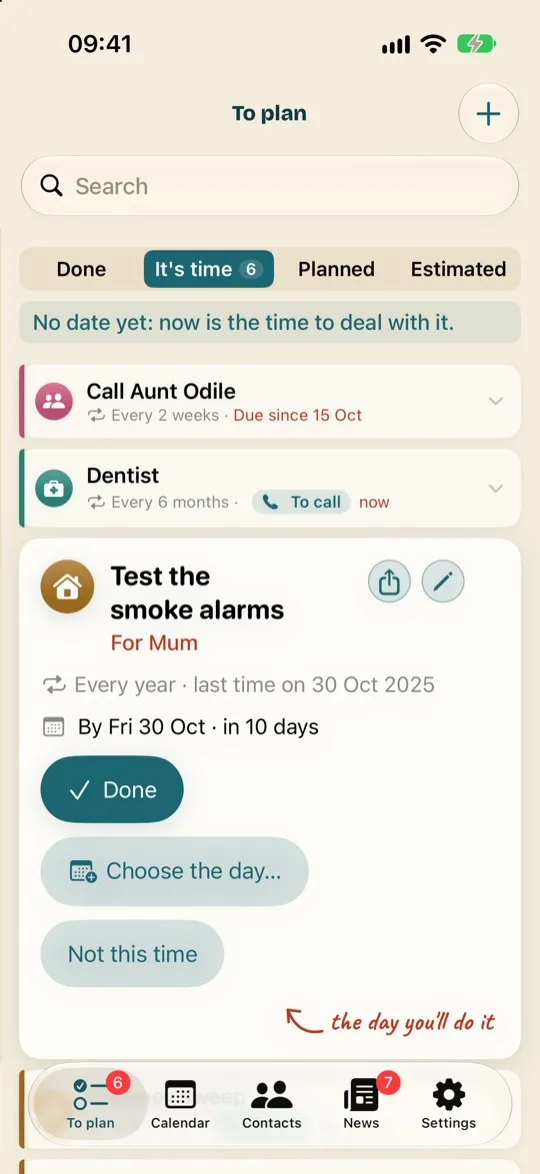
The first thing to note down
- Tap + at the top of the To plan tab.
- Choose a suggestion, for example “Boiler service”: TimeAcappella already knows how often it comes round.
- Answer its questions, one per screen. The last one is the one that matters: “When was the last time?”
- Tap “Add”: the thing goes into To plan, and the app will remind you when the time comes.
You'll find all the details in Add something to plan.