
Book an appointment
When to call, noting the appointment once it's booked, moving it, and what happens afterwards.
For things that need an appointment (the chimney sweep, the garage, the eye specialist), TimeAcappella tells you early enough to get one in time: it allows for how long it takes to get an appointment.
When to call
The thing shows “To call”. Open it to see by when to call, and why: for example, “Call by Sun 25 Oct, in 5 days: it takes about 4 weeks to get an appointment.”
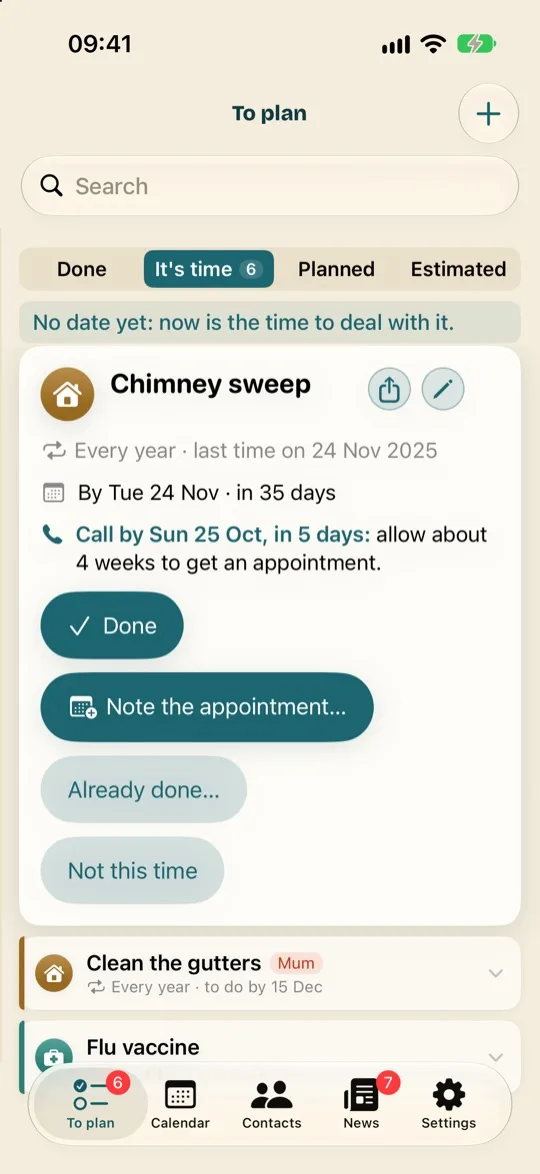
Noting the appointment
- Once you've booked the appointment, open the thing and tap “Note the appointment…”.
- Choose the date and time. The place is optional.
- Tap “Save”.
The appointment goes into your calendar, the thing waits for its day in “Planned”, and the app reminds you the day before.
Moving or cancelling it
Move the appointment in your usual calendar, or drag it to a new place in the TimeAcappella calendar (Drag and drop on the calendar): the change shows up in both. If it's cancelled, open the thing in “Planned”, then tap “Cancel the appointment”. The appointment leaves your calendar, and the thing goes back into “It's time”.
After the appointment
There's nothing to confirm: once its time has passed, the appointment counts as done, on that day. It moves to “Done”, and the next time is worked out from that day.
If it didn't happen (the practice cancelled it, or you forgot), tap its line in “Done”, then “Not done”. The thing goes back into “It's time”, just as it was before the appointment.